How to "use?" Signboard?
Asked by Archetype Saber · Oct 30, 2026
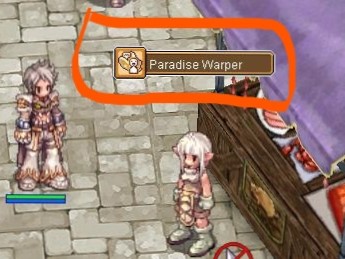
Just Like the waitingroom script in the NPC.
how to "script" "use" or "implement" this kind of feature?
1 answer
✔ Accepted fix
File location
Yes. You may create your own signboards by editing the clientside LUA/LUB file. There is no server-side configuration for it.
The file is located at:
client\data\luafiles514\lua files\signboardlist.lubExample entry
An example of one signboard is the following:
	{
		"izlude",
		197,
		205,
		10,
		IT_SIGNBOARD,
		"유저인터페이스\\item\\ship_ticket.bmp",
		"Ship to Alberta and Byalan",
		"#0x00FFFFFF"
	},
The first three are explanatory: It's the map and coordinates.
10 corresponds to the height (i think in pixels, or some arbitrary unit) above the NPC's head. Setting it to 0 means that it is immediately above the NPCs head.
IT_SIGNBOARD is the type. Examples are shown below.
The following is the filepath to the image resource.
The last one, I believe is for the color of the text (I have not tweaked this value so I am not sure).
End result
And it results into the following:
IT_SIGNBOARD
IT_BMP
Notes
As of posting (December 19, 2018), Asheraf's Translation (commit 8377a6b7340773d0c5ea18987b1c82be0ec1dd05) (https://github.com/Asheraf/Translation/blob/master/data/luafiles514/lua%20files/signboardlist.lub) does not have a translated signboardlist.lub.
Use Zackdreaver's translation (commit 8377a6b7340773d0c5ea18987b1c82be0ec1dd05) (https://github.com/zackdreaver/ROenglishRE/blob/master/data/luafiles514/lua%20files/signboardlist.lub) instead.
Note that the links above are to the master copy of the Git repositories. The commit IDs shown above are the current commit IDs on their master branches.
Know the fix?
Explain what solved it: the cause, the steps and any code. An admin checks every answer before it is shown.